
The Textile Job Portal’s web support channel provides a dashboard where users can view and monitor their recent activities and tasks.
This feature provides real-time notifications to keep users informed of the latest actions or changes they have made. By simply clicking on the activity link, users can easily navigate to the action page.
In this tutorial, we will guide you on how to access the activity pages and view all the actions you’ve taken. First, it’s important to understand what activity is.
What is activity
The term “activity” refers to any action, task, or operation that a person or entity performs. On the textile job portal support channel, when you raise a ticket, sign in to your account account, change the status of the ticket, and reply to the tickets, these all actions are considered activities
How to monitor activities
Users often perform multiple actions, making it difficult to remember all of them. The task activity section displays all tasks in a list, allowing users to easily find and review relevant actions.
- Login to your account and go to the support channel dashboard.
- Scroll down a page and find the “My Recent Activity” section.
- Click on “All activities”.
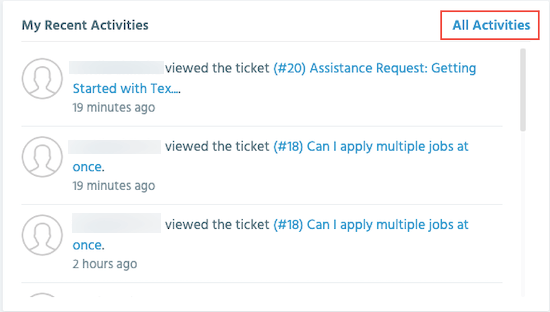
- You will be reached at the “Activities” page where you can monitor activities and sessions, download your activities, and refresh the page.

- You can filter activities by selecting a date range, including today, yesterday, last 7 days, last 30 days, and a custom range.

How to monitor sessions
The term “session” refers to the current state of your device or PC, including details like its IP address, device type, browser, operating system, and login date.
This information is useful for support agents or technicians to better understand the context of your request and to resolve any issues more efficiently.

I hope this tutorial finds you well and helps to understand how to monitor activities and sessions on the Textile job portal support channel. If you have any questions or queries, please leave them in the comment section below. We would be happy to assist you.