As discussed in the previous guide, the employer can manage all the job applicants in the applicant section. They can download the candidate’s resume, review it, and approve or reject it.
Once the profile is approved, the next step is to arrange an interview with the candidate. Textile Job Portal provides a service to efficiently arrange, schedule, and complete interview meetings with candidates.
How do you arrange/schedule meetings?
Follow the given step-by-step guide on how to arrange a meeting.
- Login to your account and visit the dashboard.
- You can see all the meetings in the “Quick Links” section here.
- From the left sidebar, click on the “Applicants” tab.
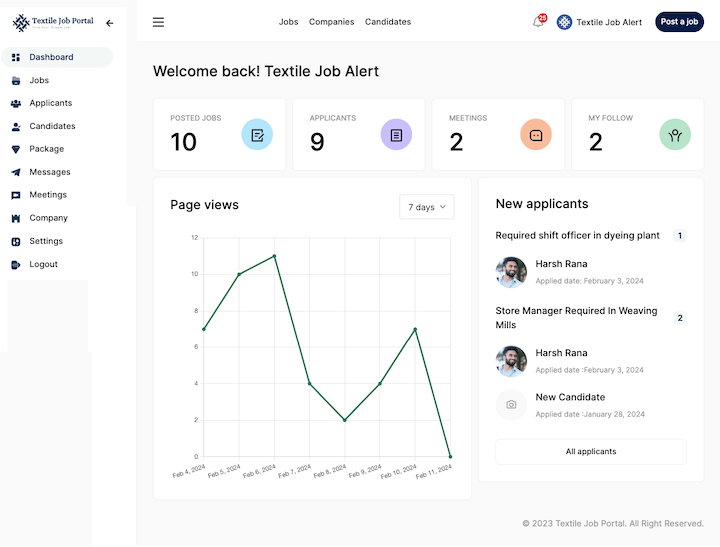
- You can view a list of all the job applicants here.
- Choose the candidate and click on the “meeting” icon.

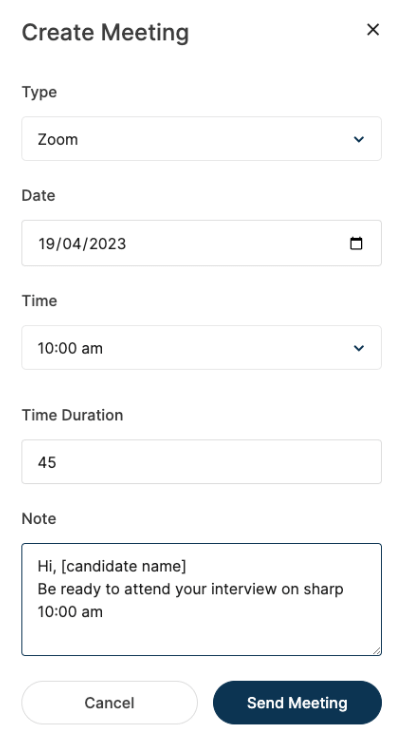
- A new popup window will open; you can schedule the meeting by entering the required information.
- Select the meeting type to Zoom, date, time, duration, and messages.
- Once complete, click “Send Meeting ” to send the candidate the details.
How do you manage meetings?
When an employer sends meeting details to the candidate, in the same, the candidate will get an email. For example, the email template looks like this company sent you a meeting request. Candidate can open their dashboard and be ready for the same.
Conversely, the employer can also go to the meeting page by clicking on the meeting tab from the sidebar menu. From where you can manage all the interview meetings sent to the candidates, whether it is pending, upcoming or completed.

You can see the three options at the bottom of the meetings. From here, by clicking on the three dots, you can edit the meeting, mark it as complete if you have done it before time or delete it.