
On the job portal, candidates can rate companies based on factors such as culture, work environment, growth opportunities, work-life balance, and success. This helps other candidates make informed decisions about whether to join or work with the company.
We recommend following this tutorial on how to rate companies and write reviews on their pages on the textile job portal. Additionally, review the terms and conditions before submitting a rating or review.
In this tutorial, we will discuss how to edit, delete, and manage reviews from your dashboard. We offer a centralized dashboard where you can view all the reviews you’ve written, edit and update their ratings, as well as delete them. You won’t need to visit each company’s page separately.
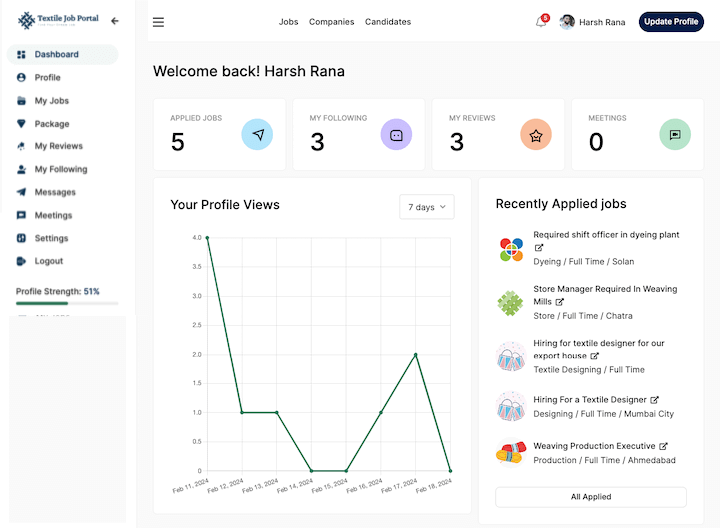
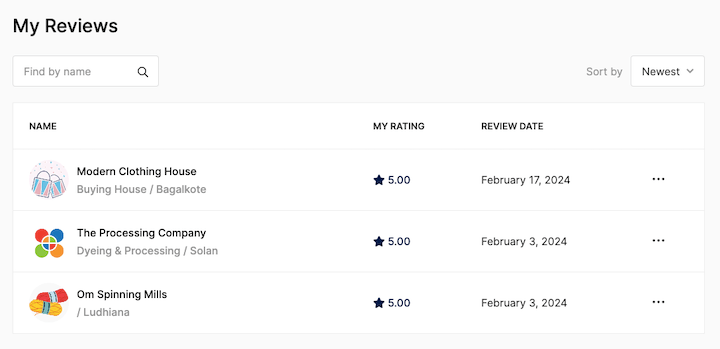
As shown in the below image, we have reviewed 3 companies.
- Click on “My Review” in the left-side menu to access all reviews.
Manage all reviews
After clicking on the “My Review” option, you will be directed to the “all reviews” page where you can view all your reviews. On this page, you will be able to see the companies you have reviewed, their corresponding categories and locations, as well as your ratings and the dates of your reviews.
Find companies using filters
Similarly, If you have multiple reviews, you can search them by company name, or a company category. In addition, users can sort reviews with the newest and oldest filters on the right side.
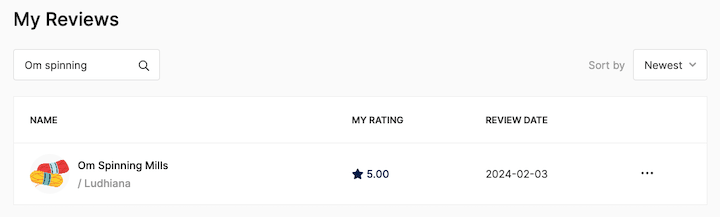
For example, In the image below, I searched for a company by typing its name or a keyword in the search bar and pressing enter.
Here is the result.
Review Metadata
Here is some basic information that you should know: name, review date, and your rating.
- Name:- It show the company name along with company category and location.
- My rating:- It is a score from 0 to 5 that shows how well a company has been rated by customers.
- Review date:- When writing a review for this company, the ‘Review date’ field indicates the date on which the review was written.
How to edit a review?
After submitting a review, you have the option to edit or update it later if needed.
To make changes to a review, go to the right-hand side of the page and click on the three-dot option. Here you will see two options – ‘edit’ and ‘delete’. Choose the ‘edit’ option and you will be directed to the review section of the company page as shown in the image below.

Update your review by entering your feedback and clicking the “Update Review” button to successfully submit your review.
How to delete a review?
To delete a review, go to the right-hand side of the page and click on the three-dot option. Here you will see two options – ‘edit’ and ‘delete’. Choose the ‘delete’ option. Your review was successfully deleted from the company page.

I hope this tutorial finds you well. If you have any questions, feel free to leave them in the comment section below or contact us at company@textilejobportal.com.