
On Textile Job Portal, candidates can follow companies to stay up-to-date with the latest openings and apply on time. In this tutorial, we will discuss two methods that candidates can use to follow companies.
To follow a company on the textile job portal, candidate must log in to their account. If you have not created an account yet, we would like to refer you to a guide on how to create an account on the textile job portal.
How to follow a company on the textile job portal
To follow a company on the textile job portal, follow the below steps.
Option 1
- Login account
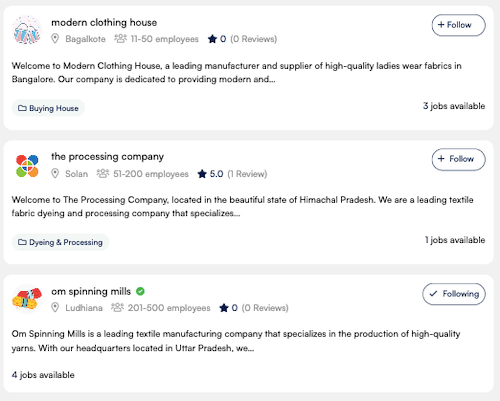
- Go to the main menu and click on companies

- You will be reached at the all companies page.
- Here you can see all the companies listed on the textile job portal.
- Select the company you want to follow.
- Click on the “follow” button.
Option 2
- Login account
- Go to the main menu and click on companies
- You will be reached at the all companies page.
- Here you can see all the companies listed on the textile job portal.
- Select the company you want to follow.
- Click on the company.
- You will be reached at the company single page.
- Here, in the header section, You will find the “follow” option.
- Click on the “follow” option.

You have successfully followed the company.
All the companies you follow can be easily managed through the “My Following” section on your dashboard. For more information on managing followed companies, refer to our guide on how to manage followed companies on the textile job portal.
I hope this tutorial finds you well. If you have any questions, feel free to leave them in the comment section below or contact us at company@textilejobportal.com.