The textile job portal is a platform built for the textile industry, where companies can connect with talented job seekers to fill open positions. In this article, we will provide a step-by-step guide for candidates on how to apply for a job on a textile job portal.
Is it necessary for candidates to create an account to apply for jobs?
Account creation is mandatory to apply; however, users can browse job details and information without logging in.
We recommend creating an account, completing your profile, and applying for jobs. This will enable you to manage jobs, track your application status, receive interview details, and grow your profile.
Also, it will help employers to obtain more information about you, increasing the likelihood of your application being accepted.
Here is a step-by-step tutorial on creating an account and optimising your profile on a textile job portal.
How to apply for a job (for logged-in users)?
Please follow the steps below to apply for a job on the textile job portal.
- Visit textilejobportal.com
- Log in to your account with your username/email and password.
- Go to the main menu,
- You can find three options: jobs, companies, and candidates.
- Click on jobs.

Once you click the jobs button, a new page will open up and display all the available jobs on the textile job portal.

When searching for jobs, it’s essential to filter the results to find the most suitable ones based on your qualifications, location, work experience, skills, and other relevant factors.
To do this, click the filter bar option, choose the appropriate filters, and browse the relevant job listings that match your profile.

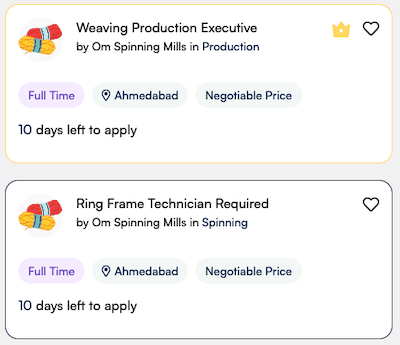
For example, we applied some filters and got this result. In each job card, you can find the job title, company hiring, department, salary, job type, location, and the days left to apply. This information helps you get a quick overview of the job.
- Choose the job you want to apply for and click on it.
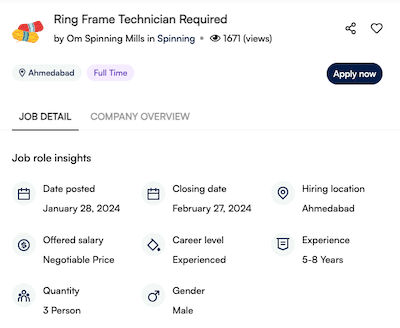
Here you can get all the necessary details about the job, including job posting date, closing date, location, offered salary, career level, required work experience, number of vacancies, education, job type, company overview, and detailed job description.
- Click on the “Apply Now” button.
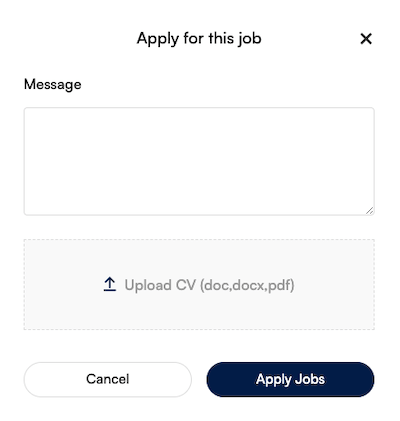
After clicking the button, a new window will appear. The first step is to write a brief message to the employer where you can ask them to review your profile, provide a short introduction about yourself or explain why you are interested in this job. The second step is to upload your updated resume.
- Click on “Apply Jobs”.
Your job application has been successfully submitted to the employer. They will review your application and verify it. If you meet the employer’s criteria and are eligible, your application will be approved and you will receive an email at your registered email address.
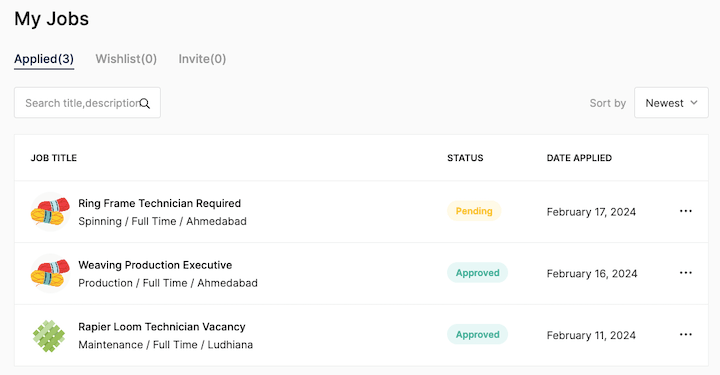
You can see the status of applied jobs by visiting the dashboard. For this, you will have to click on the dashboard and click on My Jobs.
Our job application status is currently pending. When the employer approves, the status will change to “approved”, and the colour will turn green.
I hope this guide finds you well. Please don’t hesitate to contact us if you have any questions at company@textilejobportal.com.