
On the textile job portal, employers can invite candidates to apply for a specific job post and manage all the invitations from their dashboard.
In this tutorial, we will discuss about how employers can manage, view, or delete invitations sent to candidates.
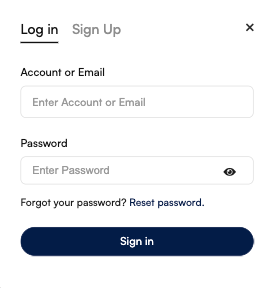
- First of all, employers must log in to their accounts. New or guest users should check this guide first “How to create an employer account on the Textile Job Portal a step-by-step guide.”
- Go to the dashboard, and click on the “Candidates” option from the left side main menu.
- You will be reached at the page where you can manage your following, followers, and invitations.
- Switch the tab to “Invite”.
- Here is a list of all invited candidates along with their name, department, designation, current salary, and location.
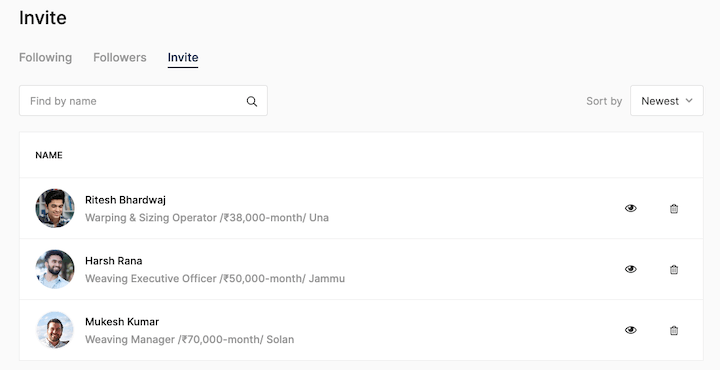
Find candidates using the search bar & sort by filter
If you have sent multiple invitations and need to find a specific candidate, you can do so by using the search bar. Simply enter the candidate’s name or a relevant keyword in the search field and press the search button.
Additionally, you can sort the list of candidates from newest to oldest or oldest to newest by using the “sort by” filter.
For example, as shown in the image below. I’m trying to search for a candidate named “Ritesh”, I enter their name in the search bar and click the search icon.
Here is the result.

How to view or delete an invitation
Employers can view or delete candidate invitations by following these steps.
- Select the candidate you want to visit a profile.
- On the right-hand side, you will find an “Eye Icon”.
- Click on it.
- You will be redirected to the candidate profile page.

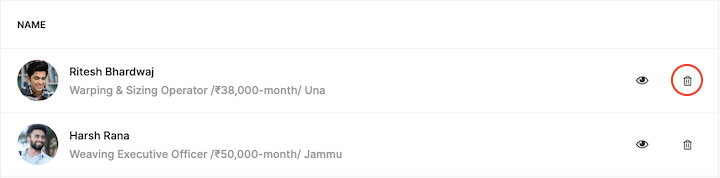
To delete a candidate invitation, follow the given steps.
- Select the candidate you want to delete an invitation.
- On the right-hand side, you will find a “Delete Icon”.
- Click on it.
- Invitation successfully removed from your list.
I hope this article finds you well. If you have any questions, please don’t hesitate to contact us at company@textilejobportal.com. We are happy to help you.